For years, paying with Bitcoin was more of a slogan than a real option. You could buy it, hold it, and watch the price, but actually spending it on something was awkward and rare. That has changed. More merchants accept it, the tools have improved, and the process now takes minutes rather than technical know-how.
Still, paying with Bitcoin is not quite the same as tapping a card, and knowing the small differences saves you from the mistakes beginners tend to make. If you have ever wondered how to pay with bitcoin without wading through jargon, this guide walks through the whole thing, from setting up a wallet to completing a payment at checkout.
What You Actually Need First
Before you can pay with Bitcoin, you need three things in place. None of them are complicated, but skipping one is where people get stuck.
- A wallet to hold your Bitcoin and authorise payments.
- Some Bitcoin in it, bought from an exchange or received from someone else.
- A merchant or person who accepts it, whether online, in a shop, or directly.
That is the entire setup. Everything else is detail on top of these three.
Step One: Set Up a Wallet
Your wallet is the tool that stores your Bitcoin and signs off on payments. It does not literally hold coins, it holds the keys that let you spend them, but for practical purposes think of it as your account.
There are two broad types, and the difference matters for how you pay.
- Hot wallets are apps on your phone or computer, connected to the internet. They are convenient for spending because they are always to hand.
- Cold wallets are physical devices kept offline. They are safer for large amounts but less practical for a quick payment.
For day-to-day paying, a hot wallet on your phone is the sensible choice, much like the difference between a current account you spend from and a savings account you keep untouched. If you want to compare specific options, this rundown of the best crypto wallets covers both hot and cold types and which suits which purpose.
Keep your recovery phrase written down somewhere safe and offline. It is the only way back into your wallet if your phone is lost, and nobody can recover it for you.
Related: Best Crypto Wallets: Hot & Cold Options Reviewed
Step Two: Get Bitcoin Into the Wallet
Once the wallet exists, it needs funding. Most people buy Bitcoin on an exchange and then send it to their wallet, though some wallets let you buy directly inside the app.
Whichever route you take, the key habit is to send a small test amount first when moving Bitcoin to a new address. A tiny transaction confirms everything works before you move a larger sum, and it costs almost nothing.
Having funds already sitting in a spending wallet is what makes the checkout itself fast. When the moment comes to spend at a merchant, the money is ready to go rather than stuck mid-transfer from an exchange.
Step Three: Make the Payment
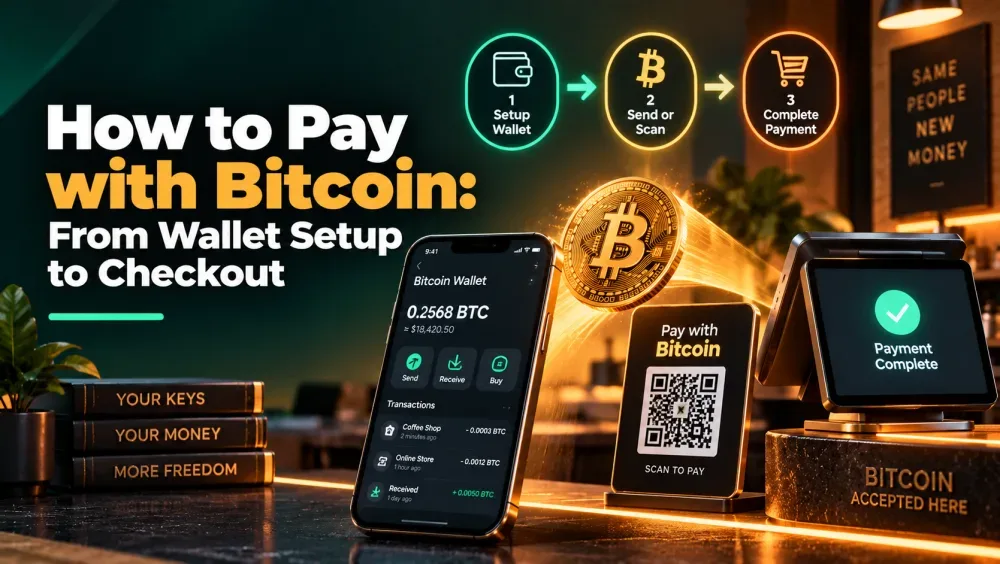
This is the part that feels unfamiliar the first time and obvious every time after. Paying with Bitcoin almost always works through one of two methods.
Scanning a QR code: In most cases the merchant just shows you a QR code. It has their address and the amount baked into it, so you open your wallet, point your phone at it, glance over the details it pulls up, and hit confirm. That is the version you will run into most, at a till or on a checkout page.
Copying an address: Some online checkouts skip the code and instead give you a long Bitcoin address plus the amount to send. Here you copy the address, drop it into your wallet, type in the amount yourself, and send. It is a bit more manual, and it is the method where people are most likely to slip up, usually by not checking what they pasted.
In both cases, the transaction is broadcast to the network and confirmed within minutes. Some merchants treat a payment as complete the moment it appears, others wait for one confirmation.
Understanding Fees and Confirmations
Two things surprise newcomers: the fee, and the wait.
Every Bitcoin transaction carries a network fee that goes to miners, not the merchant. It varies with how busy the network is, which is why the same payment can cost more at some times than others. For small everyday purchases, this is worth paying attention to.
| Factor | What it means for paying |
| Network fee | Paid by you, varies with congestion, unrelated to purchase size |
| Confirmation time | Usually minutes, occasionally longer when the network is busy |
| Lightning Network | A faster, cheaper layer for small Bitcoin payments |
That last row is worth knowing. The Lightning Network is a system built on top of Bitcoin specifically to make small payments fast and nearly free. Where a merchant supports it, paying a few dollars in Bitcoin becomes practical in a way the base network is not always suited to.
Where You Can Actually Pay
Acceptance is wider than most people assume, though still uneven. The strongest areas are:
- Digital services, including VPNs, hosting, and software subscriptions.
- Travel, with a growing number of flight and hotel booking sites.
- Gift cards, which let you turn Bitcoin into spending power at shops that will not take it at the register.
- Some physical retail, particularly in crypto-friendly cities and through payment apps.
For anywhere that does not accept Bitcoin directly, a crypto card or a gift-card service fills the gap by converting your Bitcoin to local currency at the point of sale.
Mistakes to Avoid
A few habits separate a smooth first payment from a frustrating one.
- Sending to the wrong network. Bitcoin should go to a Bitcoin address. Sending it through the wrong network or to an address for a different coin can lose the funds permanently.
- Ignoring the fee at busy times. Paying a large fee on a small purchase makes no sense. Check the fee before confirming, and use Lightning where you can.
- Not double-checking the address. Always verify the first and last few characters of an address before sending. Malware has been known to swap copied addresses.
- Treating it like a card chargeback. Bitcoin payments are final. There is no reversing one if you make a mistake, so care at the point of payment matters more than with a card.
The Short Version
Paying with Bitcoin comes down to a simple sequence. Set up a wallet, fund it, then pay by scanning a QR code or pasting an address, keeping an eye on the network fee as you go.
The first payment feels slightly strange because there is no bank in the middle and no undo button. After that, it becomes routine. As acceptance grows and tools like the Lightning Network mature, the gap between spending Bitcoin and tapping a card keeps narrowing, and the awkwardness that once defined crypto payments is quietly disappearing.